Postprocess is the power tool. It’s a JavaScript block that runs after all queries and computed fields, giving you access to the entire result set at once. Need to group, sort, pivot, aggregate, or reshape your data? This is where it happens.
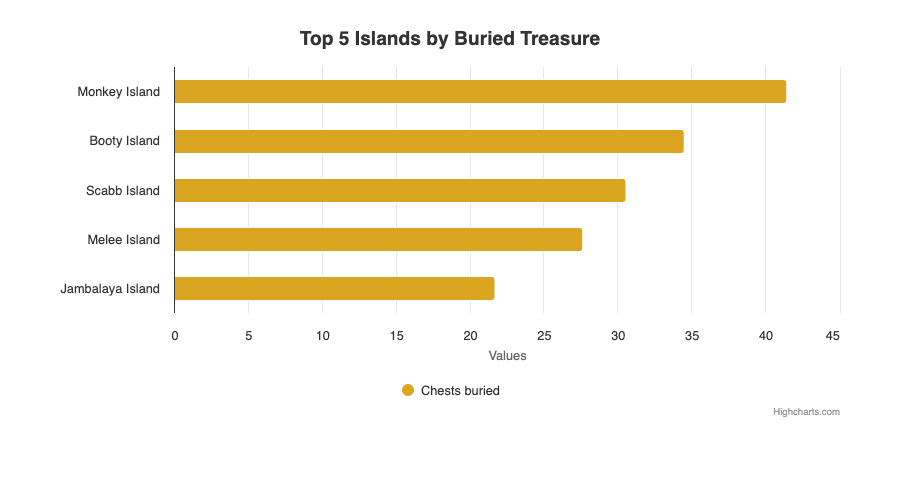
Sort descending and take the top 5 — two lines of postprocess JavaScript.
Used by 16% of HRM components — not as common as computed fields, but essential for the complex ones.
📋 Syntax
postprocess: |-
  // JavaScript code
  // $result is the full array of data rows
  // Must reassign $result at the end
  $result = $result.map(row => ({
    ...row,
    newField: row.existingField * 2
  }));
⚠️ Critical Rules
$resultmust always be an Array at the end — never an Object$resultis mutable — you can reassign it- All computed fields are available on each row in
$result - Postprocess runs once per query context, not per row
Example: Population Change Calculation
This postprocess groups data by name, calculates percentage changes across years, and creates delta labels:
postprocess: |-
  const createDeltaLabel = (difference) => {
    if (Math.abs(difference) < 0.05) {
      return `<span style="color: lightgrey;">⬭</span> ${Math.abs(difference).toFixed(1).replace('.', ',')} %`;
    } else if (difference < 0) {
      return `<span style="color: red;">▼</span> ${Math.abs(difference).toFixed(1).replace('.', ',')} %`;
    } else {
      return `<span style="color: blue;">▲</span> ${Math.abs(difference).toFixed(1).replace('.', ',')} %`;
    }
  };

  const calcChange = (data, yearStart, yearEnd) => {
    const popStart = data.find(d =>
      d['cube.stichtag'].startsWith(yearStart)
    )?.['cube.population619'] || 0;
    const popEnd = data.find(d =>
      d['cube.stichtag'].startsWith(yearEnd)
    )?.['cube.population619'] || 0;
    return popStart === 0 ? 0 : ((popEnd - popStart) / popStart) * 100;
  };

  // Group data by name
  const groupedData = {};
  $result.forEach(row => {
    if (!groupedData[row.name]) {
      groupedData[row.name] = [];
    }
    groupedData[row.name].push(row);
  });

  // Aggregate per group
  $result = Object.entries(groupedData).map(([name, data]) => {
    const change2000_2023 = calcChange(data, '2000', '2023');
    const change2020_2023 = calcChange(data, '2020', '2023');
    return {
      'cube.populationChange': change2000_2023,
      'cube.populationChange_2020': Math.abs(change2020_2023),
      'cube.delta_label': createDeltaLabel(change2020_2023),
      'name': name
    };
  });
🧩 Common Patterns
Flatten Nested Data
When API responses contain nested objects (e.g., TIE salary_quantiles):
postprocess: |-
  $result = $result.map(row => ({
    ...row,
    q10: row.salary_quantiles?.q10 || 0,
    q50: row.salary_quantiles?.q50 || 0,
    q90: row.salary_quantiles?.q90 || 0
  }));
Top-N Filtering
postprocess: |-
  $result = $result
    .sort((a, b) => b['cube.weightedShare'] - a['cube.weightedShare'])
    .slice(0, 10);
Data Pivoting
Transform rows into a different structure:
postprocess: |-
  const grouped = {};
  $result.forEach(row => {
    const key = row['cube.category'];
    if (!grouped[key]) grouped[key] = { name: key, values: [] };
    grouped[key].values.push(row['cube.value']);
  });
  $result = Object.values(grouped);
German Number Formatting
postprocess: |-
  $result = $result.map(row => ({
    ...row,
    formattedValue: row['cube.value'].toFixed(1).replace('.', ',') + ' %'
  }));
⚡ vs. Computed Fields — When to use which?
| Feature | Computed Fields | Postprocess |
|---|---|---|
| Runs | Per row | Once on full result |
| Access | Single row + arguments | All rows ($result) |
| Can filter/sort | No | Yes |
| Can aggregate | No | Yes |
| Can change row count | No | Yes |
| Execution order | Before postprocess | After computed fields |
Rule of thumb: Use computed fields for per-row transformations, postprocess for aggregations and reshaping.